
The simplest and fastest way to complete an accident statement — in any European country.
Your driver completes the European Accident Statement step by step in the app or browser. Your office sees it in real time and can message both drivers in their own language.
You can start straight away: add the vehicle and invite the driver, even at the moment an accident happens. Nothing else to prepare, and nothing to install.
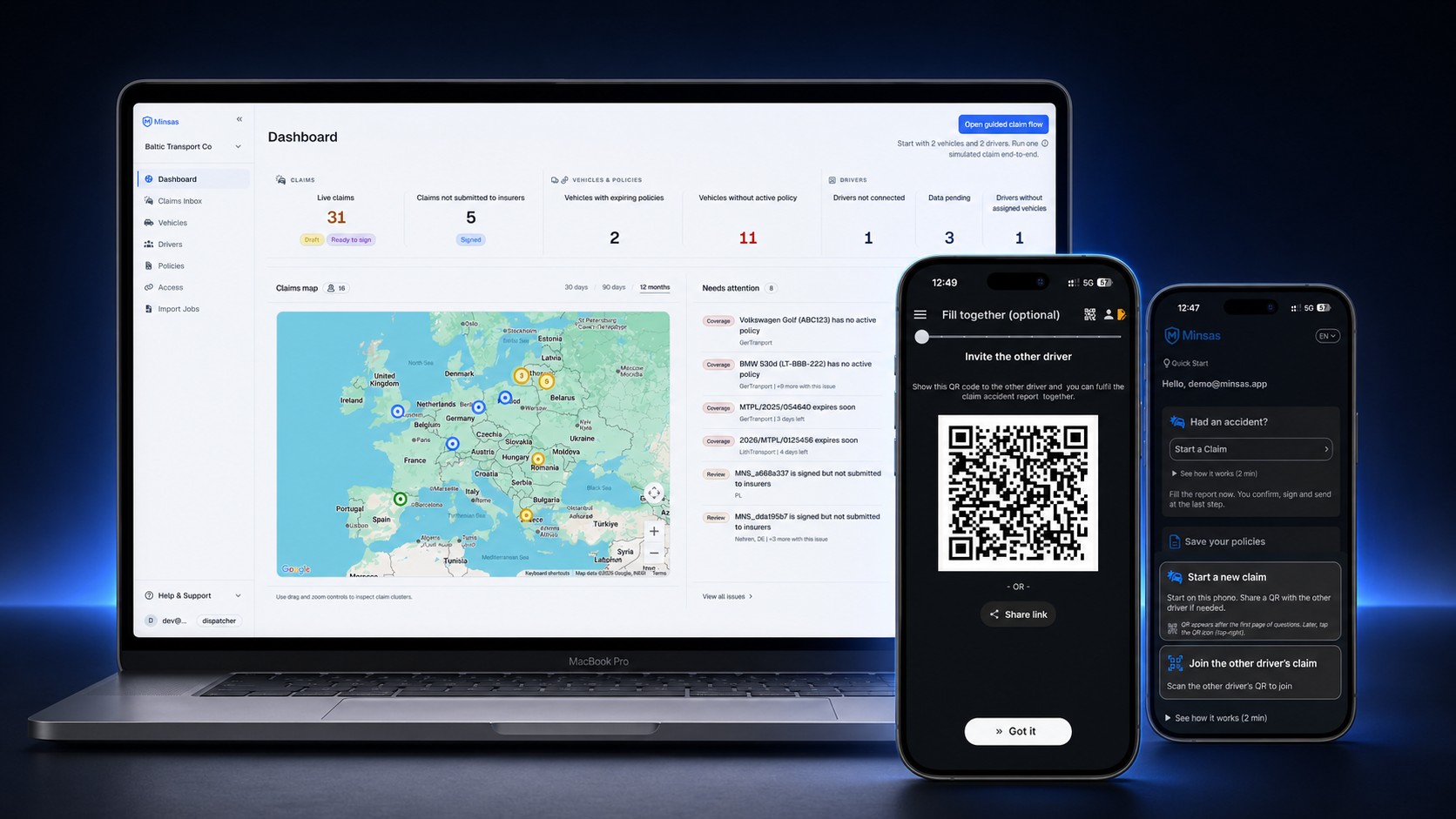
- You receive the completed statement, with photos, both drivers’ details and signatures, in minutes.
- You decide whether to send the statement to your insurer, broker or claims administrator, or transfer it into your own systems.
How accident reporting happens today
The statement is completed on paper, while the office receives information through calls, messages and photos.
- The driver does not know what to do. Stress and an unfamiliar form make it hard to complete the statement. Calling the police for help can mean hours waiting at the scene.
- Abroad, it is harder still. A language barrier and unfamiliar local requirements make it harder to collect clear, complete information.
- The office sees only what the driver sent. Scattered messages make it difficult to spot missing information. The gaps become clear after the driver has left the scene.
- After the accident comes manual work. Someone has to retype details into internal systems and chase missing vehicle, policy and contact information.
While the driver waits at the scene, the vehicle stands still and orders run late. An incomplete or inaccurate statement makes fault harder to prove.
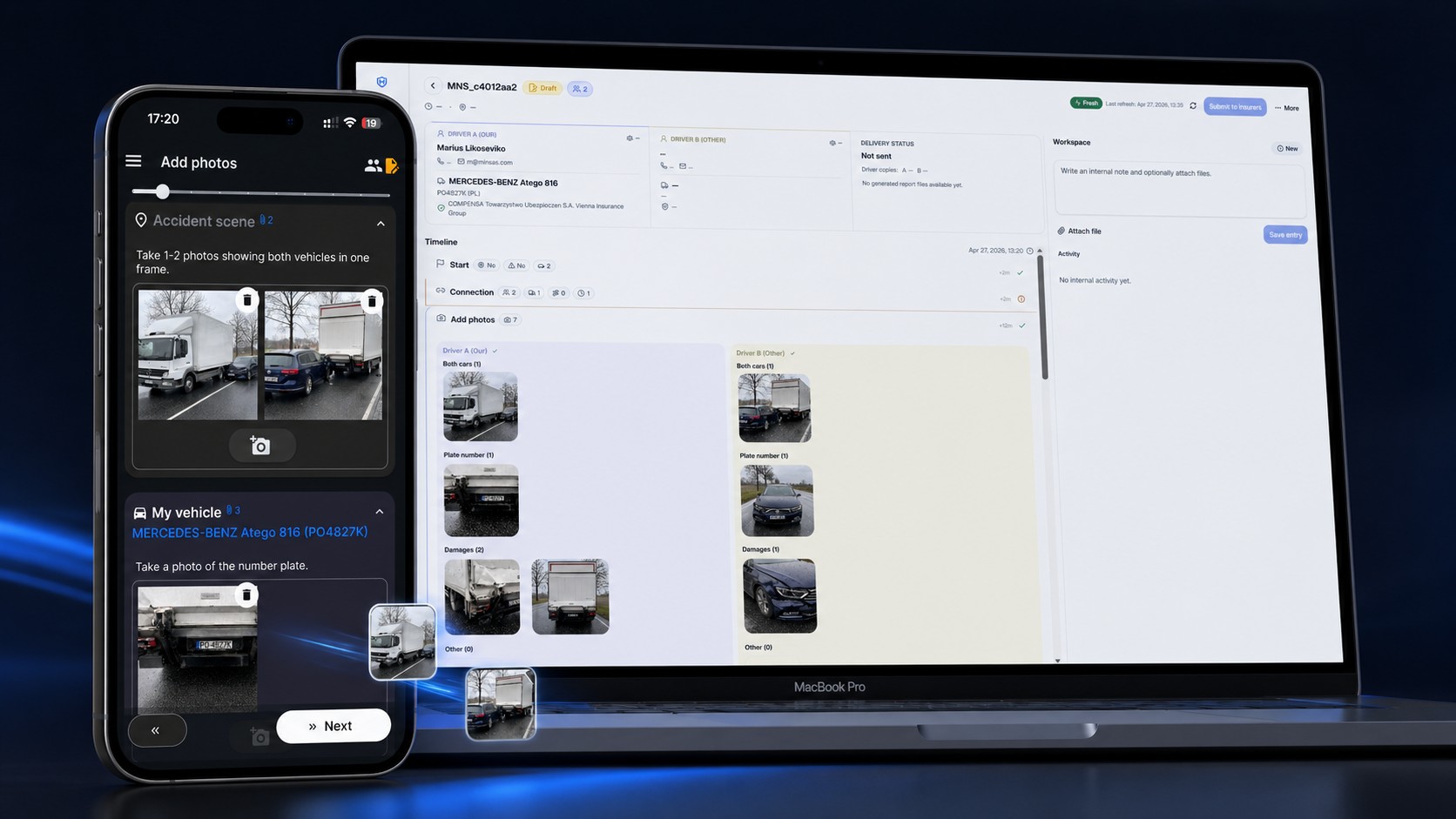
How Minsas helps your driver and your company
From adding vehicle and driver details to reviewing the claim file.
- 1
Add the details — in advance or when an accident happens.
Upload a file or photo to add vehicles, driver contacts and policies — in advance or when your driver calls after an accident. Review and confirm the details read by AI. Link the driver and send an invitation before they start a company report. Start with the vehicles you need.
- 2
At the scene: the driver completes the statement.
The details added by your office are already in the statement. No typing required: the driver takes photos, makes selections and records voice notes if needed. AI reads data from documents and photos. Both drivers can complete and sign on one phone. On separate phones, the other driver joins the same statement by QR, with nothing to install. Each driver fills in and signs in their own language.
- 3
In the office: your team reviews the claim file.
You see the claim file taking shape in the portal before the driver confirms and signs the statement. You can message both drivers, and each can read the messages in their own language. While your driver is still at the scene, you can request corrections or more photos. You decide when and where to send the claim file.
In the same portal, manage claims and policies and review statistics. You choose how much of the platform to use.
If anyone is injured or more than two parties are involved, Minsas immediately prompts the driver to call the police.
Try it with your own drivers.
Try it with two vehicles and two drivers. Run a test report from start to finish without sending anything outside the company. You can report real accidents from day one.
First month — the full platform, free.
Minsas fits every company that runs vehicles: haulage, passenger transport, parcel delivery, courier services, taxi, car rental and service fleets.
Built for accident reporting across Europe
The standard European form.
With Minsas you complete the standard European Accident Statement, the form insurers across Europe process every day.
Independent of insurers.
Minsas is not owned by any insurance company. Your claim file is sent to an insurer only when your company decides.
Built in Europe.
Data is hosted in the EU and handled in line with GDPR. We process only what Minsas needs to work.
Alongside your TMS and telematics.
Minsas complements your transport management system. Your driver completes the accident statement, while your company manages the claim file, policies and driver documents.
Simple fleet pricing
€0.50
per vehicle / month
You pay only for the vehicles in your portal — not your fleet size on paper.
The rate you join at stays with your subscription for as long as it remains active.
First month — the full platform, free.
Payments are handled by Stripe — card details never touch Minsas.
How can Minsas help your company?
Meet the Minsas founder to see driver reporting in the app or browser and your team’s claim review in the portal.
Discuss how to start today and get answers to your questions.
Frequently asked questions
Help your drivers prepare before an accident happens with our accident reporting guides.